SNi50
|
|
|
1: Button to reset the appliance to its factory settings (defaultconfig). 2: USB 3.0 port 3: USB-C port console access 4: SFP+ ports 5: Connection of the protective earth circuit 6: Six-pole screw terminal connector (for redundant electrical power supply that accepts a range between 12V and 48V DC) |
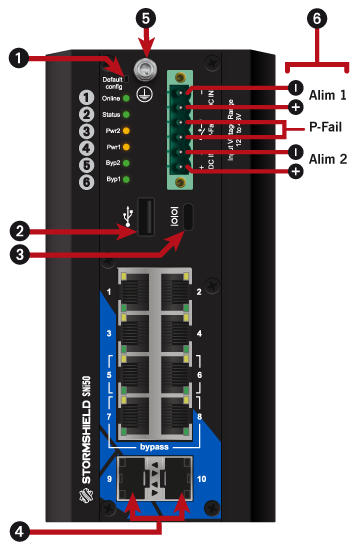
With the USB-C port (3), a computer can connect to the SNS firewall in console mode, to launch the restoration process from the USB drive.
- Ensure that the SNS firewall is powered off.
- Insert the USB drive into the USB 3.0 port (2).
- Connect the USB-C port to a USB-A port on the computer, by using the cable provided with the SNS firewall.
- Launch a console emulator on the PC to access the SNS firewall (115,200 baud - 8N1).
- Power up the SNS firewall, which will immediately start running on the USB drive.
- Continue to the section Starting the restoration of the SNS firewall.