Enabling the auto login option
The auto login option can be enabled on saved connections. This will automatically set up the connection when the Stormshield SSL VPN client starts.
Auto login requires a manual operation in the following cases:
- If access to saved connections is protected, you have to enter the access password to unlock access to saved connections.
- If additional information is required, such as an OTP or a password, you will need to enter it.
Checking whether the auto login option is enabled
An "Auto login" label appears in the section of a saved connection if the Connect automatically option is enabled.

Enabling the auto login option on a saved connection
This option can only be enabled on a single saved connection.
-
For the saved connection in question, click on the
 button, and on Edit.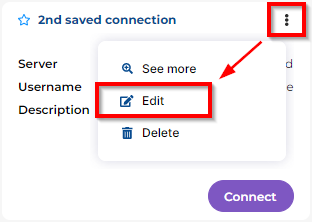
- Select the Connect automatically checkbox.
- Click on Edit to save changes.
-
If the auto login option is already enabled on another saved connection, you need to indicate whether you wish to replace it with the connection currently being edited.
Click on Replace to confirm the changes.