IMPORTANT
SNS 3.x versions have reached End of Maintenance since July 1st, 2024.
We recommend that you update your SNS firewalls to a version with maintenance to guarantee the protection of your infrastructure.
Keepalive
When an IPsec tunnel is not in use, it can be shut down after a set period to release resources on appliances. However, if traffic must pass through this tunnel, negotiations must be started all over again. This will generate latency and cause minor packet loss. With the keepalive mechanism, traffic can be generated artificially in an IPsec tunnel to keep it running. This type of traffic is of no use when it is received and can be filtered without being logged.
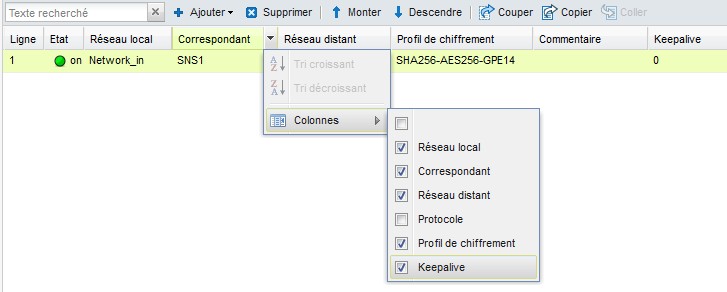
R48 | Configure Keepalive
The Keepalive function should be enabled, and traffic sent from the remote appliance should be filtered.
This feature can be configured in VPN > IPsec VPN > Encryption > policy – Tunnels as shown in the image above. Scrolling over the header of any column in the table will display an arrow. Click on it then go to the Columns menu to choose whether to display the Keepalive column. The interval between two requests can then be modified. A value of zero means that it is not in use.