Allowing mobile users to set up IPsec VPN tunnels
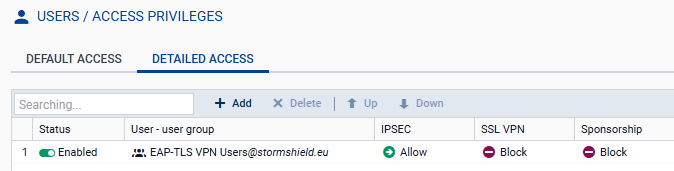
In Configuration > Users > Access privileges > Detailed access tab:
- Click on Add.
- In the Domain name field, select the directory (domain) of users authorized to set up IPsec tunnels. In this example: stormshield.eu.
- In the User – Group field: select the user group from the list. In this example: EAP-TLS VPN Users.
- Click on Apply.
A row will be added to the grid. - Click on the cell in this row in the IPsec column and select Allow.
- Double-click on the cell in this row in the Status column to show the status Enabled.
- Click on Apply then on Save.
The users in this group are now allowed to set up IPsec tunnels: