Viewing OIDC/Microsoft Entra ID authentication monitoring components
Log in to the web administration interface of the firewall.
Accessing connection events
- Go to the Monitoring tab > Logs - Audit logs menu.
- Click on Users.
Lines regarding Microsoft Entra ID authentication contain the keyword "OIDC" in the Method column.
Example:
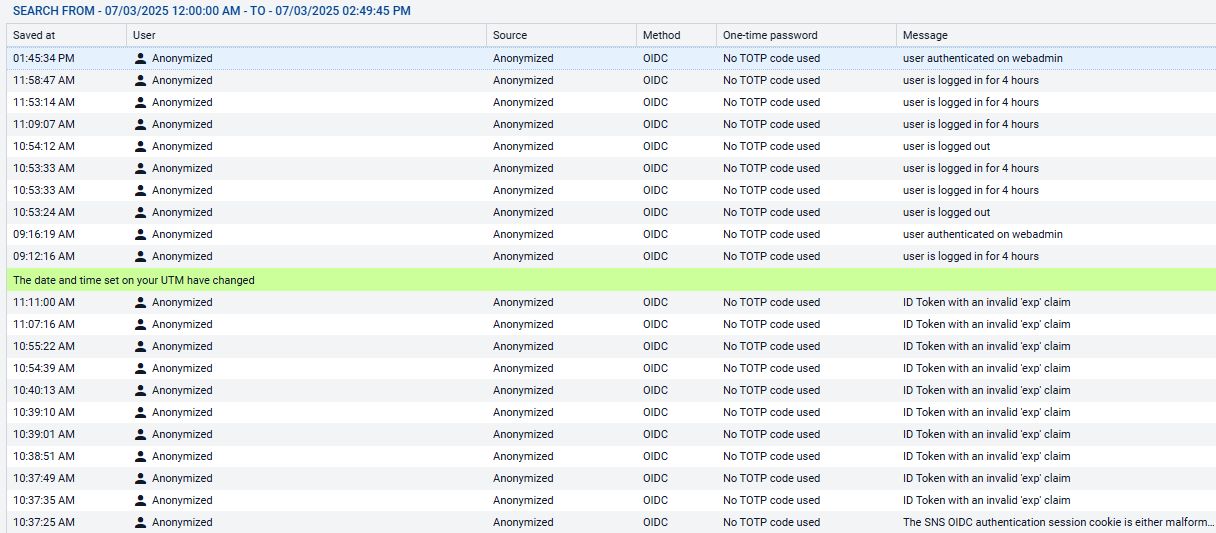
This example illustrates the fact that before the firewall date and time were synchronized, OIDC/Microsoft Entra ID authentication was not working ("ID Token with an invalid 'exp' claim" messages - see section Resolving incidents - Common errors).
Accessing details of users connected via Microsoft Entra ID
- Go to the Monitoring tab > Monitoring menu.
- Click on Users.
Lines regarding Microsoft Entra ID authentication contain the keywords "OpenID Connect (OIDC)" in the Auth method column.
Example:
