Using the VPN client
Manual start
Manually starting Cybels VPN consists of voluntarily initiating a secure connection between the user's workstation and the remote network over an encrypted tunnel.
The connection remains active until it is manually disconnected, or when the network connection is lost or expires.
Click on "Start the VPN" to start the VPN session. Ensure that the workstation has an Internet connection.
The application indicates that the VPN has indeed been started, by showing several indicators such as:
-
The "Protected" status with a green padlock in front of it
-
The application logo in green
-
How long the tunnel has been up, in the "Connected for: ..." field
-
The name of the tunnel, "Cybels VPN Client" in the example below
-
The upload and download speeds expressed in KB/s
-
Additional details in "Show all details", to view all the parameters that were negotiated when the tunnel was being set up, based on the administrator's configuration.
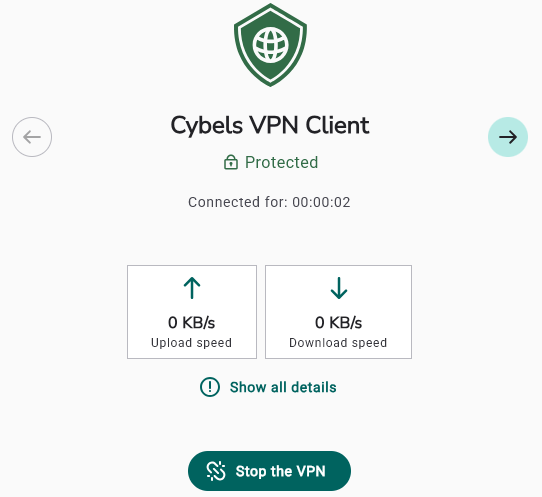
Click on "Stop the VPN" to shut down the tunnel.

The connection remains up until it is voluntarily disconnected, there is an extended loss of network signal, or the session expires.
Automatic start
In a future version of Cybels VPN Premium