Getting started
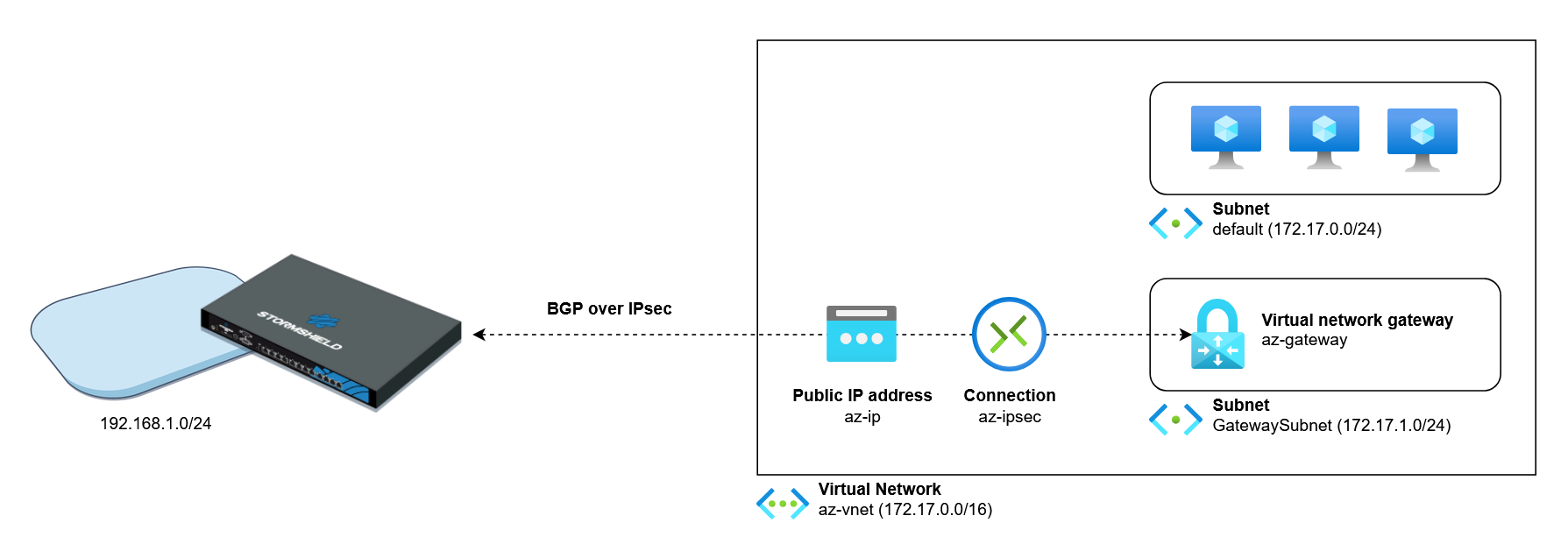
This document describes the process of setting up an IPsec tunnel that relies on IPsec virtual interfaces (VTI) between an SNS firewall and a Microsoft Azure environment.
Using a model architecture, this technical note illustrates the configuration that you will need to apply to the Microsoft Azure environment and the SNS firewall. The document also explains how to set up BGP dynamic routing, which allows your local network and the Microsoft Azure virtual network to communicate through the tunnel.
Since there are many possible configurations, adapt these examples to your own architecture and requirements.
NOTE
In this technical note, the Microsoft Azure cloud computing environment is referred to as "Microsoft Azure". Although the names of Microsoft Azure resources and environment menus are in English, you can change the language settings if necessary.
Requirements
-
An SNS firewall in version 5.1 or higher,
-
An Azure account with a valid subscription and access to the Microsoft Azure portal.
-
The IP address that is used to set up tunnels can be located behind a network address translation (NAT) device.
| Date | Description |
|---|---|
| October 22, 2026 |
New document |