SNxr1200
Enabling Secure Boot in the SNS firewall’s UEFI
-
Connect the SNS firewall to a monitor using a DVI cable.
-
Plug a USB keyboard into the SNS firewall.
-
Start the SNS firewall and immediately press [Del] several times to stop the SNS firewall startup sequence.
-
Go to the Security tab by using the arrow keys.
-
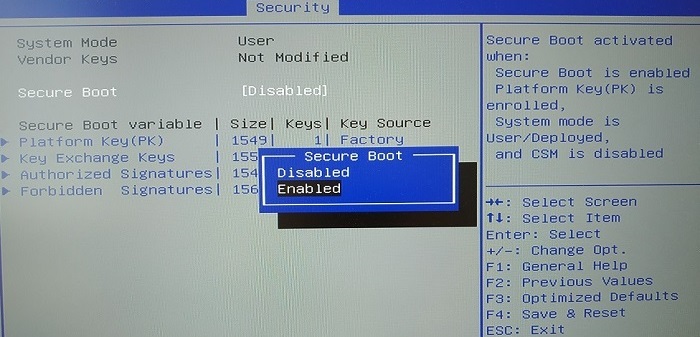
Select Secure Boot and press [Enter].
-
Change the status of the Secure Boot parameter to Enabled.
-
Press [Esc] and go to the Save & Exit tab.
-
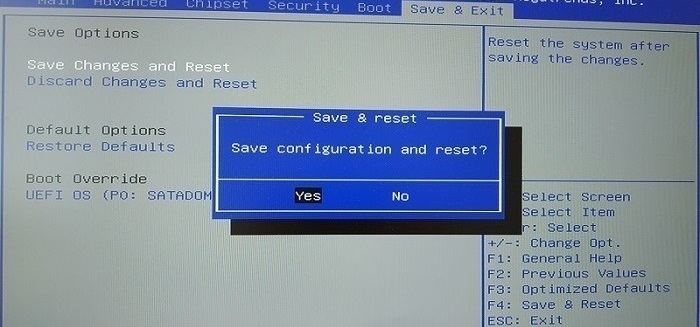
Select Save Changes and Reset and press [Enter].
-
In the Save & Reset window, select Yes then press [Enter].
Disabling Secure Boot in the SNS firewall’s UEFI
-
Connect the SNS firewall to a monitor using a DVI cable.
-
Plug a USB keyboard into the SNS firewall.
-
Start the SNS firewall and immediately press [Del] several times to stop the SNS firewall startup sequence.
-
Go to the Security tab by using the arrow keys.
-
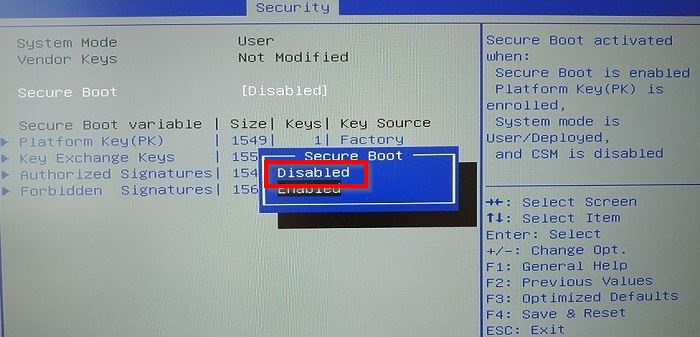
Select Secure Boot and press [Enter].
-
Change the status of the Secure Boot parameter to Disabled.
-
Press [Esc] and go to the Save & Exit tab.
-
Select Save Changes and Reset and press [Enter].
-
In the Save & Reset window, select Yes then press [Enter].