Appendix: Retrieving the SSL VPN configuration (OVPN file)
This appendix explains how to retrieve the SSL VPN configuration file (OVPN file).
You will need this file if you are connecting in OpenVPN mode. An administrator from your organization may ask you to retrieve the OVPN file.
Retrieving the OVPN file from the SNS firewall captive portal
-
Ensure that you are logged in to your organization's network.
-
Open a web browser and go to the address of the SNS firewall captive portal.
An administrator in your organization would have provided you with this address, which is generally in this format: mycompany.tld/auth or gateway.mycompany.tld/auth.
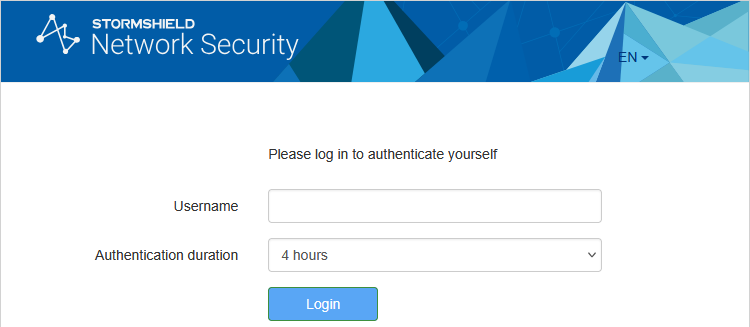
The image below shows the default captive portal login page. Do note that this page can be customized to reflect your organization's visual identity.
-
Authenticate on the login page by entering the requested information.
-
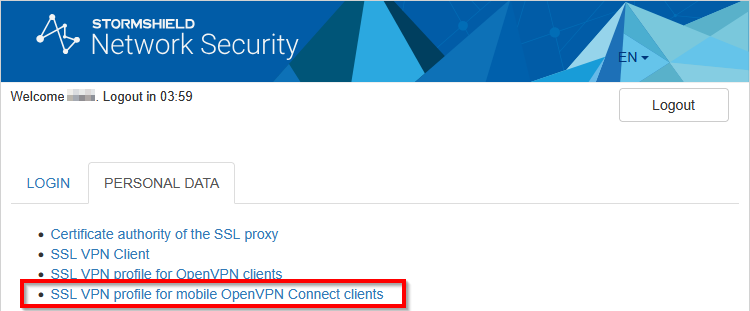
Once you are authenticated, go to the Personal data tab, and click on SSL VPN profile for mobile OpenVPN Connect clients (single .ovpn file).
-
Agree to download the OVPN file by accepting.
If you are unable to download the OVPN file, get in touch with an administrator from your organization.
Retrieving the OVPN file from the SNS firewall’s web administration interface
An SNS firewall administrator can retrieve the OVPN file from the SNS firewall’s web administration interface. For more information, refer to the section Configuring the SSL VPN service in the SSL VPN administration guide for Stormshield SNS firewalls and SSL VPN clients.