Preparing the USB flash drive
This section describes the procedure of preparing the USB drive that will be used in updating BIOS on an SN3100 firewall from an R1.04 version to version R1.06.
Downloading BIOS version R1.06 and copying it to the USB flash drive
- In your Mystormshield area, go to Downloads > STORMSHIELD NETWORK SECURITY > TOOLS > STORMSHIELD NETWORK SECURITY-TOOLS.
- Download the .zip file SN3100 BIOS R106 by clicking on its name.
-
Verify the integrity of the downloaded .zip file by using its SHA256 hash:
7b1a22bc00144aef29ab75806e64eb4f7b15bafaa37127149e2371278bed9da1
- Unzip the archive SN3100_BIOS_R106.zip to the root folder of your USB flash drive.
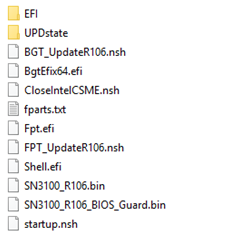
- Verify the root folder of your USB flash drive. You should find the following files and folders in it:
-
Verify the integrity of the binary file SN3100_R106_BIOS__Guard.bin using its SHA 256 hash:
8fb24bc284dabe87a91b635aa7d71b026c03d150a8b09189c959dae7a393549e
-
Verify as well the integrity of the binary file SN3100_R106.bin using its SHA256 hash:
704129a704bccd43f014fa15a06013d4c824e5856ede8f769333124b8d760fce
Your USB flash drive to update BIOS and the Intel Management Engine firmware to version R1.06 is ready.