Understanding the requirements
 Global requirements and recommendations on administrators and network rules
For information, refer to section Understanding the global requirements
Network requirements
The diagram and the table below describe the various streams of incoming and outgoing traffic on the KACLS server. Configure your network to allow the following connections:
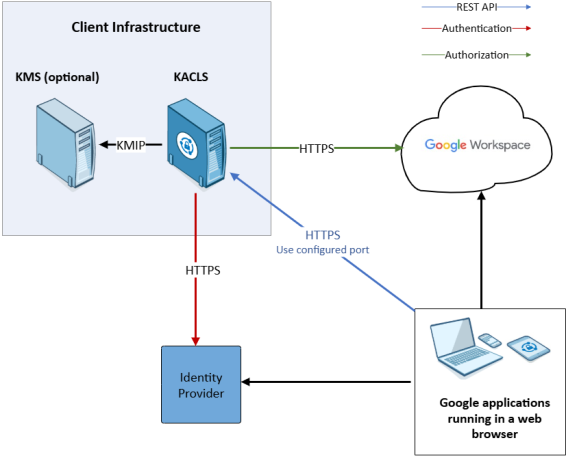
|
Description |
Protocol |
Source |
Source port | Destination | Destination port |
|---|---|---|---|---|---|
|
The KACLS REST API |
HTTPS | Google application | * | Stormshield KMaaS | Depends on the administrator's configuration (config.json) |
| Getting the configuration of OpenID authentication | HTTPS | Stormshield KMaaS | * | OpenID endpoint | Specified by the configuration of the authentication service (usually 443) |
| Getting the configuration of the JWKS authorization | HTTPS | Stormshield KMaaS | * | JWKS endpoint | Specified by the configuration of the authorization service (usually 443) |
| Getting decryption keys | KMIP version 1.4 | SDS for Google Workspace | * | Client’s infrastructure | Depends on the administrator's configuration (usually 5696) |
| Getting keys when persistence_type is set to database | PostgreSQL wire protocol | Stormshield KMaaS | * | Client’s infrastructure dedicated to Postgres database | Depends on the administrator's configuration (usually 5432) |
NOTE
In Docker deployment mode, you must expose the ports to the containers. For more information, please refer to your orchestrator documentation.
The content of the requests processed by the KACLS is in JSON format only. You can add the following rules to your web firewall (WAF) or load balancer to ensure optimum protection:
-
All HTTP requests are blocked except:
-
The POST requests with a Content-Type header including "application/json".
-
The GET and OPTIONS requests without a Content-Type header or with a Content-Type header including "application/json".
-