Generating KEKs
You can configure several kinds of keys in the Stormshield KMaaS :
-
KEKs and Master encryption keys (i.e., MKEK) for symmetric encryption use cases,
-
KEKS for asymmetric encryption use cases with the Key Access Management,
-
KEKs for Microsoft Double Key Encryption.
The Stormshield KMaaS does not generate KEKs, so you must create them beforehand.
 Generating KEKs and MKEKs for symmetric encryption
KEKs for symmetric encryption are 256-byte AES-256 keys listed in the keks.json file in the form of base64-encoded character strings.
To create KEKs, you can use OpenSSL for example:
- On a Red Hat system, install OpenSSL by using the following command:
yum install openssl. - On a Linux system, install OpenSSL using the package manager corresponding to your distribution.
- With the
randcommand, data directly encoded in base64 can be generated:openssl rand -base64 32 -
To improve the security of the Stormshield KMaaS, you can optionally use OpenSSL to generate Master encryption keys (i.e., MKEK). An MKEK is used to encrypt your KEKs so that they are not exposed in clear text in the configuration file.
The MKEKs must be as follows:
-
They must be 256 bits in size,
-
They must be base64-encoded,
-
They must encrypt the KEKs with a 12 byte initialization vector and a 16 byte authentication tag.
The diagram below illustrates how the MKEK encrypts KEKs.
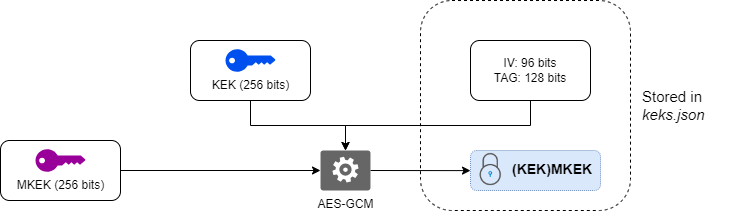
For more information on aes-256-gcm encryption to generate the MKEK, the encrypted KEK, the initialization vector and the tag, see the ANSSI document ANSSI-PG-083.
If you are using at least one KEK encrypted by an MKEK, you must declare the MKEK_VALUE environment variable containing the value of the MKEK encryption key before starting the Stormshield KMaaS.
Generating asymmetric KEKs for KAS rewrap
The asymmetric KEKs are only used for wrapping and unwrapping operations via the kas/rewrap route. They must be as follows:
-
4096-bit RSA key pairs,
-
Each key pair consists of a private and a public key,
-
The public key OID must be 1.2.840.113549.1.1.1.
They are listed in the keys section of the keks.json file. For more information, refer to section Adding KEKs to the file.
The procedures for managing and securing the files are the same as for symmetric keys. For more information, refer to section Generating KEKs and MKEKs for symmetric encryption.
To create an asymmetric RSA key pair with OpenSSL:
-
Create the 4096-bit private key:
openssl genpkey -algorithm RSA -out private_key.pem -pkeyopt rsa_keygen_bits:4096
-
Extract the public key:
openssl rsa -pubout -in private_key.pem -out public_key.pem
Generating DKE key pairs
Double Key Encryption (DKE) relies on asymmetric RSA key pairs used by Microsoft to protect Data Encryption Keys (DEKs). Each key pair consists of 2048-bit RSA private and public keys.
They are listed in the keys section of the keks.json file. For more information, refer to section Adding KEKs to the file.
To generate the keys required for the DKE module, run the following commands:
-
Create the 2048-bit private key:
openssl genpkey -algorithm RSA -pkeyopt rsa_keygen_bits:2048 -out private.pem
-
Extract the public key:
openssl rsa -in private.pem -pubout -out public.pem